
Churn signals and renewal actions, right inside Slack
Dyle brings account reports and feedback into the conversations where your renewal teams already work, so they can see which accounts need attention and record what happens next without leaving Slack.
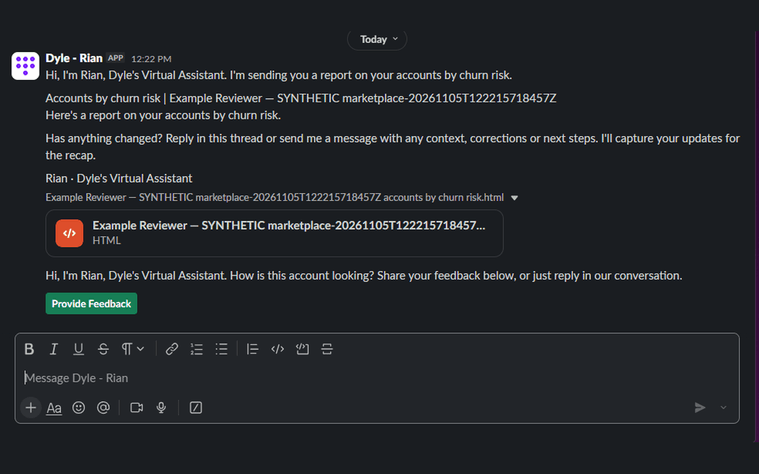
With Dyle in Slack, teams can
Account reports
Receive account reports highlighting churn risk and recommended next actions.
Feedback, your way
Provide feedback through structured forms, direct messages or replies in report threads.
Account updates
Share account updates, correct information and record next steps.
Follow-up questions
Receive follow-up questions about reports and planned actions.
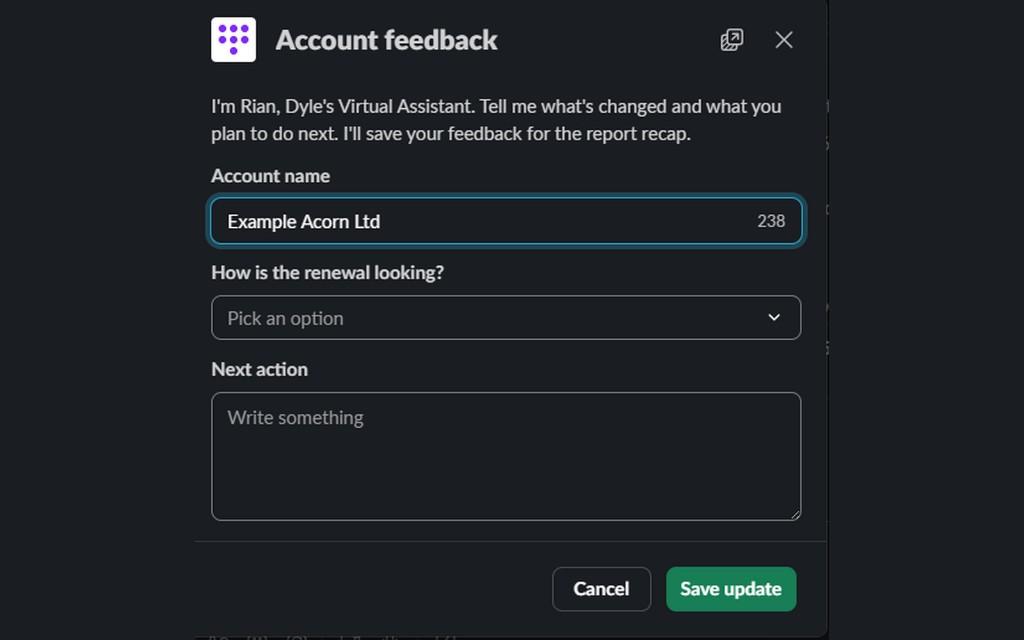
Every update is saved against the account
Relationship managers can receive reports in designated channels or directly from Rian, and tell Dyle what has changed and what they plan to do next.
Dyle saves submitted feedback against the relevant report. In channels Dyle has been invited to, it also saves the messages posted there and links them to the relevant accounts, giving teams a record of the account context collected through Slack.
Get started in three steps
- 1
Add Dyle to Slack
Click Add to Slack and approve the connection for your workspace. A Dyle account is required.
- 2
Invite Dyle to your channels
Type
/invite @Dylein any channel where you want reports delivered or account conversations picked up. - 3
Act on reports in Slack
Rian, Dyle’s Virtual Assistant, sends reports and follow-ups. Reply in the thread or use the feedback form.
Dyle is powered by AI (LLM) technology. Responses generated by the app may not always be accurate and should be verified before use.
A Dyle account and an authorised Slack connection are required. Channel delivery and feedback collection depend on the destinations and permissions configured for your workspace.